
لقطات الشاشة
عن التطبيق
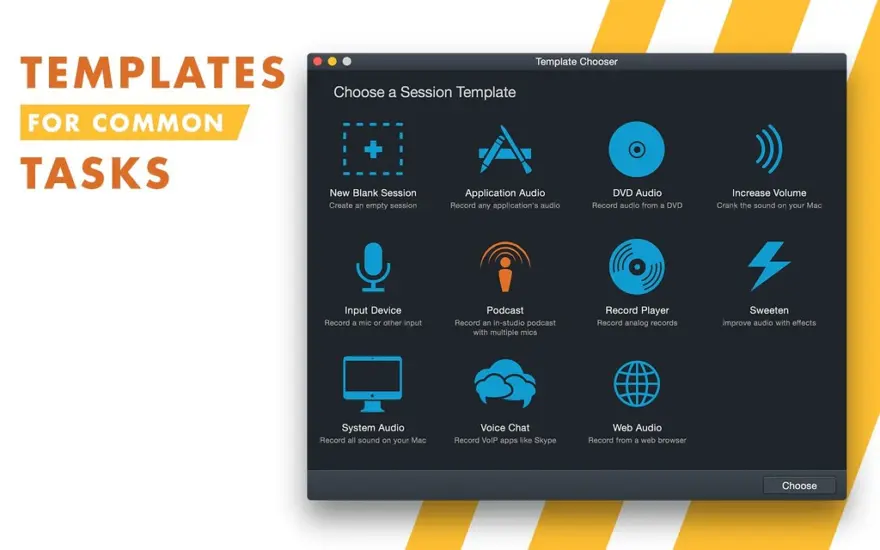
Audio Hijack drastically changes the way you use audio on your computer, giving you the freedom to listen to audio when you want and how you want. Record and enhance any audio with Audio Hijack – it’s the cornerstone of your digital audio experience.
Audio Hijack will allow you to record any application’s audio, from Internet streams to DVD audio and everywhere in between. If your machine can play it, Audio Hijack can record it. And that’s not all – Audio Hijack will also enhance any audio, unsing industry-standard VST and AudioUnit audio effects to make your music sound incredible. Record. Enhance. Enjoy!
ما الجديد
Preliminary Support for MacOS 27 (Golden Gate) Betas
Audio Hijack no longer warns on launch when run on MacOS 27 (Golden Gate). There are no known issues on Golden Gate at present.
Do note that Apple’s betas remain in flux. We always encourage users to stick with official (non-beta) OS releases for the best experience.
Updates for the “Transcribe” Block
The built-in “Transcribe” block has been enhanced with a new “Recommended” transcription model, as well as enhancements provided by updating the Whisper.cpp backend from version 1.7.4 to 1.9.2.
Yandex Telemost VoIP Capture Support
Yandex Telemost is now supported as a VoIP audio source, making it easy to record both halves of a conversation.
When a recording is in progress, certain menu options will now correctly disable in the “Actions” and contextual menus.
A host tempo sync has been added for Audio Units that require it for operation, such as Audiomodern’s “Panflow”.
A very rare error importing Audio Hijack 3 presets that reference a source app that is missing on disk has been fixed.
Easier Access to Test Releases
It’s now easier to be notified about pre-release versions of Audio Hijack. In the “Settings” window, you can adjust the new “Check for” menu from its default “Official Releases” option to “Official and Test Releases”. More details on test releases can be found in this support article.
This setting was previously found in the app’s hidden “Debugging” window. It has now been promoted to the main interface.
دعم التقاط Quo VoIP
أصبح تطبيق Quo لسطح المكتب (المعروف سابقًا باسم OpenPhone) مدعومًا الآن كمصدر صوت VoIP، مما يجعل من السهل تسجيل نصفي المحادثة.
يتم حفظ الإعدادات في كتلتي "البث" و"البث المباشر" مرة أخرى كما هو متوقع، مما يؤدي إلى تصحيح الانحدار الذي تم تقديمه في Audio Hijack 4.5.8.
تم تصحيح مشكلات الرسم البسيطة المتعلقة بمؤشر الرسوم المتحركة "البث".
MacOS 14.4 أو أعلى مطلوب الآن
يتطلب برنامج Audio Hijack الآن MacOS 14.4 أو أعلى. إذا كنت تستخدم إصدارًا أقدم من نظام التشغيل MacOS، فتأكد من الاطلاع على صفحة البرامج القديمة الخاصة بنا.
المتطلبات
- Intel, معالج 64-بت
- macOS 14.4 أو أحدث
روابط التحميل
ملحقات موصى بها
روابط تابعة لـ AliExpress — قد نحصل على عمولة عند الشراء عبرها، دون أي تكلفة إضافية عليك.
 USB C to HDMI Adapter 8K, Thunderbolt 3 to HDMI…
10.09 USD
USB C to HDMI Adapter 8K, Thunderbolt 3 to HDMI…
10.09 USD
 Genuine Original 128GB 256GB 512GB 1TB SSD Solid State Drive…
59.36 USD
Genuine Original 128GB 256GB 512GB 1TB SSD Solid State Drive…
59.36 USD
 Laptop Protective Case For MacBook Air 11.6 Air 13.3 Air…
9.91 USD
Laptop Protective Case For MacBook Air 11.6 Air 13.3 Air…
9.91 USD
 Type C to HDTV Adapter USB 3.1 4K@30Hz HUB HDTV…
5.15 USD
Type C to HDTV Adapter USB 3.1 4K@30Hz HUB HDTV…
5.15 USD
 1-5Pcs Polishing Cloth with Box for Apple Iphone Nano-Texture Screen…
6.45 USD
1-5Pcs Polishing Cloth with Box for Apple Iphone Nano-Texture Screen…
6.45 USD
 Desktop Stand for Mac mini M4/M4 Pro 2024 Heat Dissipation…
14.91 USD
Desktop Stand for Mac mini M4/M4 Pro 2024 Heat Dissipation…
14.91 USD